



In a nutshell: Copilot surfaces the overshared files already sitting in your tenant, and the usual fix is to clean up permissions before rollout. For a lean mid-market team, that cleanup never holds, because the tenant keeps manufacturing new exposure at creation, and the agents your employees are starting to build inherit it. The durable fix is upstream: govern how workspaces get created, not how they get cleaned.
On this page
- Why does Copilot surface files people were never meant to see?
- Isn't cleaning up permissions before Copilot enough?
- What happens to oversharing when employees start building agents?
- Why can't a mid-market team clean its way out of this?
- Where does the oversharing mess come from?
- How do you keep a tenant Copilot- and agent-ready without constant cleanup?
There is a lot of talk, and a fair amount of alarm, about Copilot oversharing. Most of it asks the right questions and lands on the same advice: clean up your Microsoft 365 tenant before you switch Copilot on. Whenever I read it, my first thought is the same: true, but that is not the whole story.
Because a few months after the cleanup, the permission mess is back. New Teams get spun up, sites inherit broad membership, owners leave, labels never get applied, and the tenant drifts right back to where it started. Cleaning up before Copilot treats the symptom. It does nothing about the thing that keeps producing it. And now there is a second wave arriving, built by your own employees, one agent at a time.
So this article is about the part the cleanup advice leaves out: why the exposure keeps regenerating, what agents do to it, and how governing the way workspaces get created stops the cycle instead of resetting it.
Why Does Copilot Surface Files People Were Never Meant to See?
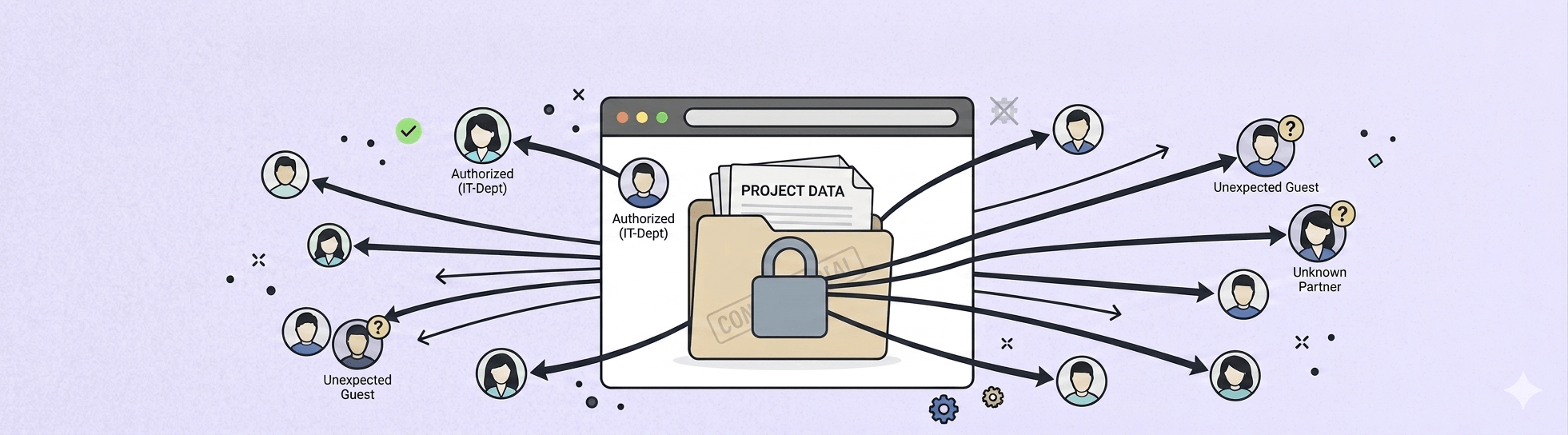
Copilot reads whatever the person prompting it can already open. Years of sharing links, broad group memberships, and permissions inherited from old reorganizations become searchable through plain language, so access that sat dormant for years surfaces the moment someone asks the right question.
The scale of that dormant access is documented. Concentric AI's Data Risk Report found that 16% of business-critical data sits overshared, an average of roughly 802,000 files per organization. Little of it was shared carelessly. A site defaults to broad membership, a link gets created for one meeting and never scoped back, someone changes teams and keeps access from the old job. It accumulates quietly, and it is the exposure everyone is talking about. It is also the symptom, not the root.
Isn't Cleaning Up Permissions Before Copilot Enough?
Cleanup is necessary, but it is temporary, because the tenant drifts back toward exposure the moment new workspaces get created without governance. You can remediate every overshared site this quarter and be back in the same position next quarter, because nothing changed about how the next hundred workspaces come into being.
This is the difference between operational remediation and system design. Cleanup is maintenance you repeat forever. When every workspace is created differently, cleanup becomes permanent maintenance; when creation is governed by design, Copilot and agents inherit a cleaner, more predictable information architecture from the start. That distinction matters more now than it did a year ago, because a second wave of exposure is arriving, and it is being built by your own employees.
What Happens to Oversharing When Employees Start Building Agents?
A Copilot agent inherits the content access of the person who built it, and unlike a one-off chat it runs shared, persistent, and repeatable. One over-permissioned workspace stops being something a single user might stumble into and becomes a reusable service that answers from the same exposure on demand, for everyone the agent is shared with.
Search exposes oversharing when someone goes looking. Agents operationalize it, turning inherited access into a reusable experience. If the workspace underneath is over-permissioned, unowned, and stale, the agent does not need to break any rule to create risk. It makes the existing exposure easier to query, repeat, and share.
Analysts are already tracking the sprawl. At Gartner's April 2026 Digital Workplace Summit, senior director analyst Max Goss reported that only 13% of organizations believe they have the right agent governance in place, and tied the ungoverned spread of agents directly to oversharing and data loss. Gartner's headline projection is enterprise-scale, an average Fortune 500 running over 150,000 agents by 2028. The mechanism is not enterprise-specific, though. Any employee with a Microsoft 365 license can now build an agent, which means the risk reaches the mid-market too, just without the governance team a large enterprise keeps on staff to catch it. Goss also noted that blocking agents outright is not a durable answer, because employees who can't use sanctioned tools route around them into shadow AI, which carries greater risk.
Why Can't a Mid-Market Team Clean Its Way Out of This?
For a lean team, remediation is a treadmill, because the mess regenerates faster than a small staff can scan and fix it. A five-person IT function can run a cleanup project, but it cannot manually re-audit every new Team, site, and shared link at the rate a growing company creates them.
The starting position is worse than most teams expect. The average tenant scores 39 out of 100 on BindTuning's Integrity Score, well inside the exposure band, which means drift is not the exception, it is the normal state of an ungoverned environment. Nobody watches that drift happen in real time. It builds across ownership, lifecycle, permissions, and compliance coverage until an event like a Copilot rollout makes it visible all at once. Which raises the question the cleanup framing never answers: if the mess keeps coming back, where is it coming from?
Where Does the Oversharing Mess Come From?
The exposure is created at provisioning, in workspaces spun up with no owner, no structure, and no end date, not at the permission layer where everyone is looking. Oversharing and orphaned content are downstream symptoms. Ungoverned creation is the cause.
Consider how it happens. A project team creates a Microsoft Team for a customer rollout. The connected SharePoint site inherits broad membership, documents pile up over the months, the original owner leaves the company, and no lifecycle policy or sensitivity label is ever applied. Later, someone builds an agent to help the team answer rollout questions. The agent doesn't hack anything or create new permissions. It works across the content the builder can already reach. But because that workspace was over-permissioned, unowned, and stale, the agent can now surface outdated proposals, commercial documents, and internal notes that were never meant to be part of a day-to-day answer.
Nothing in that story required a mistake: the broad membership was a default, the missing owner was ordinary turnover, and the absent label was a step no one was assigned to own. Each was normal on its own, and together they turned an everyday workspace into standing exposure the moment an agent was pointed at it. The workspace was simply never created with governance in place, and everything downstream followed from that.
How Do You Keep a Tenant Copilot- and Agent-Ready Without Constant Cleanup?
Govern creation itself. Provision every workspace with an owner, a structure, sensitivity settings, and a lifecycle already applied, so there is less to clean later and far less for an agent to surface by accident.
Microsoft's native controls belong in this picture. SharePoint Advanced Management, Purview, and features like Restricted Content Discovery are necessary guardrails, and they reduce what Copilot and agents can surface. They are not the workspace operating model, though. They don't replace a repeatable provisioning process where ownership, structure, metadata, sensitivity, permissions, and lifecycle are applied before the workspace starts accumulating content. Guardrails limit the damage. Governed creation keeps it from forming.
The independent view points the same way. Among the six steps Gartner published for managing agent sprawl are defining an agent identity, permission, and lifecycle model, and governing the information agents can reach: keeping it current, managing permissions to prevent oversharing, and archiving what is obsolete. That is a neutral analyst describing ownership, lifecycle, and permission discipline at the workspace level, which is the case for governing creation stated in Gartner's own words.
Copilot Readiness Is a Discipline, Not a Project
Copilot readiness is not a one-time security project. It is an information architecture and workspace lifecycle discipline, and the quality of what Copilot and agents can safely reason over depends on how consistently your Teams, SharePoint sites, and project spaces are created, owned, reviewed, and retired. The tenant your employees' agents will read tomorrow is the one you provision today. The organizations that get ahead of this won't be the ones that clean hardest. They will be the ones that govern creation by design.
See what governed workspace creation looks like with Automate365, with ownership, structure, and lifecycle applied the moment a workspace is born.
FAQ
Does Microsoft 365 Copilot cause oversharing?
No. Copilot surfaces content that is already overshared, faster and through plain language. It respects existing SharePoint and OneDrive permissions and creates no new access. What it changes is discoverability: files that were technically open but practically buried become answerable in seconds. The exposure predates Copilot, so the fix lives in how permissions and workspaces are managed, not in Copilot itself.
Is cleaning up SharePoint permissions enough to be Copilot-ready?
Cleanup is necessary but not sufficient on its own. A remediation project fixes today's exposure, but the tenant drifts back as new workspaces are created without owners, structure, or lifecycle. Without governed creation, you repeat the cleanup indefinitely. Lasting readiness comes from provisioning workspaces correctly from the start, so there is less to remediate and the environment stays predictable as it grows.
How do Copilot agents change the oversharing risk?
An agent can be grounded in content its builder is allowed to use, and when shared, it can turn that inherited workspace access pattern into a reusable experience. One over-permissioned workspace becomes a reusable service that answers from the same exposure on demand, for everyone the agent reaches. Agents don't break permissions; they operationalize existing ones, turning inherited access into a queryable experience. That makes ungoverned workspaces materially riskier once employees start building agents over them.
What does preventing oversharing at the source mean?
It means governing workspace creation rather than cleaning up afterward. Every new Team, SharePoint site, or project space is provisioned with an owner, a structure, sensitivity settings, permissions, and a lifecycle already applied, before content accumulates. The mess is never created, so there is far less to detect and remediate later, and Copilot and agents inherit a cleaner information architecture by default.
Can Microsoft's native controls handle this on their own?
They help, but they are guardrails, not a provisioning model. SharePoint Advanced Management, Purview, and Restricted Content Discovery reduce what Copilot and agents can surface. They do not replace a repeatable creation process that applies ownership, metadata, sensitivity, and lifecycle to every workspace at birth. Used together, native controls limit exposure while governed creation prevents it from forming.
How do I know where my tenant stands?
Run a governance scan. BindTuning's Integrity Score rates a tenant from 0 to 100 across ownership, lifecycle, permissions, and compliance coverage, and the average lands at 39, inside the exposure band. It takes about the time it takes to get a coffee, needs no rollout plan, and sorts what it finds into what to remediate now and what to prevent from recurring.