



In modern organizations, flexibility drives productivity. Collaboration tools must adapt to how people work: fast, distributed, and often across organizational boundaries. Microsoft 365 delivers this flexibility by design, making sharing and collaboration easy from the start. However, collaboration at scale introduces a less visible challenge: maintaining workspace integrity.
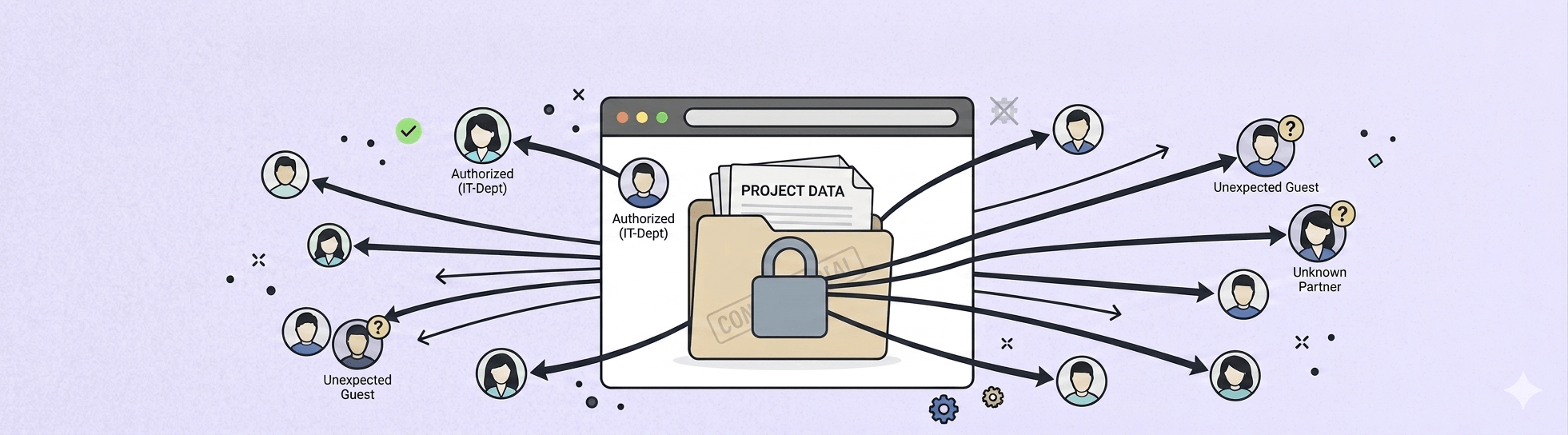
Workspace integrity means that each digital workspace (whether a standalone SharePoint site, a Team, or an Engage community) has access, visibility, and lifecycle aligned with its purpose. When that alignment erodes, oversharing emerges. Oversharing occurs when content becomes accessible to more people than originally intended, internally or externally. It is rarely intentional, but it is increasingly common—and increasingly consequential.
What is oversharing in Microsoft 365?
Oversharing occurs when content in Microsoft 365 becomes accessible to more people than intended — internally or externally. It typically happens through broad sharing links, public workspaces, guest access left open, or permission inheritance, and it rarely requires a deliberate mistake to occur.
What oversharing looks like in real Microsoft 365 environments
Oversharing typically develops through everyday actions rather than dramatic mistakes. Common examples include:
- Broad sharing links used by default
A document is shared using “People in your organization” instead of “Specific people”, granting access far beyond the intended audience.

- Public workspaces created for convenience
A Team is created as public to save time, with the intention to restrict access later, which often never happens.

- Folder sharing instead of file sharing
A user shares a folder to collaborate on one file, unintentionally exposing additional documents stored alongside it. - Guest access without a clear end point
External users are invited for short term collaboration but remain in the environment long after the work has finished. - Permission inheritance and gradual access expansion
Files stored in broadly accessible sites inherit permissions automatically, leading to visibility that no longer reflects business intent.
Individually, these actions seem harmless. Over time, they weaken workspace integrity and create environments where access no longer matches responsibility.
Why is oversharing in Microsoft 365 a security risk?
Internal exposure still carries risk
Oversharing does not require data to leave the organization to be harmful. Internally exposed HR documents, financial forecasts, or customer information can still lead to privacy issues, compliance failures, and loss of trust.
Employees may gain access to information they were never meant to see, creating governance and accountability challenges even in the absence of a breach.
Compliance becomes harder to demonstrate
Regulations such as GDPR require clear control over who can access personal and sensitive data. Oversharing undermines principles like least privilege and data minimization, making audits more complex and riskier.
When access is broad and poorly documented, answering the question “Who can see this?” becomes difficult.
The attack surface increases
The more people who can access content, the greater the likelihood that a single compromised account can be used to exploit it. Oversharing expands the internal attack surface without any explicit decision to do so.
AI and search amplify visibility
AI tools such as Microsoft Copilot respect existing permissions, but they surface information far more efficiently. Overshared content that previously went unnoticed may suddenly appear in search results or AI-generated responses, exposing gaps between intention and configuration.
What tools does Microsoft 365 provide to detect oversharing?
Microsoft recognizes oversharing as a significant governance and security challenge and provides a growing set of native capabilities across Microsoft 365 to help organizations detect and mitigate it.
Below is a high‑level overview of some Microsoft 365 capabilities that support oversharing detection and mitigation across workspaces.
SharePoint Advanced Management and access governance reports
Through SharePoint Advanced Management (or Microsoft 365 E5), Microsoft provides Data Access Governance reports that help identify potential oversharing across SharePoint sites.
These reports can highlight:
- Sites with a large number of permissioned users
- Use of broad access groups such as Everyone except external users
- Recent creation of “Anyone” and “People in the organization” sharing links
These reports help identify where to look, but not necessarily how or where to fix issues efficiently. They also require specific or additional licensing.

Microsoft Purview Data Security Posture Management (DSPM)
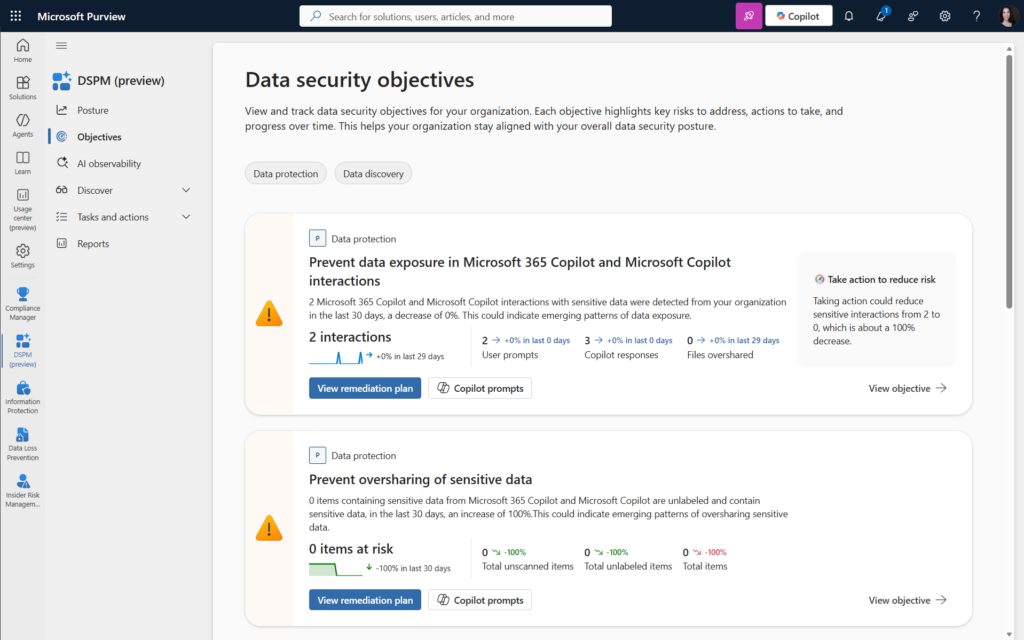
Microsoft Purview DSPM introduces risk-based assessments focused specifically on oversharing of sensitive data. Through DSPM, organizations can, among other things:
- View user prompts with sensitive information types sent to Copilot
- Review unlabeled items containing sensitive information found in M365
- Monitor files moved outside of the organization
DSPM is powerful for prioritization, but it focuses primarily on sensitive data, not all oversharing scenarios and it does not replace the need for permission-level governance.
Access reviews in Microsoft Entra
Access reviews in Microsoft Entra help organizations periodically reassess who has access to groups, Teams, applications, and guest accounts. They are particularly useful for addressing:
- Lingering guest access
- Outdated group memberships
- Compliance-driven recertification requirements
Access reviews are effective for cleanup, but inconsistent for proactive governance. Also, to manage and monitor guest access, a premium add-on is required.

Why are Microsoft's native tools not enough to prevent oversharing?
Microsoft’s native tools provide essential building blocks for managing oversharing. However, they are distributed across multiple services, require differing levels of licensing and expertise, and rely heavily on manual correlation and followthrough. The challenge is not the absence of tools, but operational complexity.
Fragmented visibility across services
Oversharing spans SharePoint, OneDrive, Teams, and Entra ID, each managed in different admin centers. Identifying public sites, broad sharing links, guest users, or orphaned workspaces with guests often requires pulling data from multiple locations and manually correlating it.
There is no single native view that continuously connects these signals.
Reporting is often indirect or scoped
Advanced insights may require premium licenses and are often limited in scope. Reports can indicate risk but rarely support immediate action, forcing administrators to switch context to investigate and remediate.
Oversharing is usually discovered late
Many issues surface only during audits, security reviews, or when sensitive content appears unexpectedly through search or AI tools. By then, access may have existed for months or years.
Access reviews depend on people
Native access reviews rely on owners understanding what they are reviewing and taking action. In practice, owners may be inactive, overloaded, or unsure why access exists, leading to minimal change.
Fixing oversharing takes time and context
Even when oversharing is identified, issues are typically surfaced in reports or audits, while fixes must be applied elsewhere, often in a different admin center and with limited context. This constant context switching slows response times and makes largescale cleanup difficult. As a result, organizations tend to focus on the most visible or highrisk cases, while lowerrisk oversharing remains unaddressed and accumulates over time.
To reduce this operational burden, some organizations complement native tooling with governance intelligence solutions such as Pulse365, which consolidate oversharing signals and enable remediation actions in context. The value lies not in replacing Microsoft controls, but in reducing the effort required to act on them.
Explore where oversharing exists today with a free Pulse365 assessment.
How do you reduce oversharing in Microsoft 365?
1. Make oversharing visible
Organizations need clear answers to questions such as:
- Which workspaces are public?
- Where do open or organizationwide sharing links exist?
- Which workspaces contain guest users?
- Which sites or Teams lack active ownership?
Visibility is the foundation of restoring workspace integrity.

2. Reduce friction in remediation
The easier it is to fix oversharing, the more likely it is to be addressed. Contextual remediation, where issues can be corrected from the same place they are identified, helps prevent oversharing from becoming permanent.

3. Prevent oversharing at creation time
Many issues originate when workspaces are created:
- Public by default
- Open to share with anyone
- Guest access enabled without review
- No labels or lifecycle defined
Provisioning automation tools such as BindTuning's Automate365 help enforce governance rules at creation time, ensuring that new workspaces start private, appropriately labeled, and aligned with external sharing policies. This strengthens workspace integrity from the outset.
Create your first governed template with Automate365, at no cost.

Conclusion
Oversharing in Microsoft 365 is rarely intentional. It emerges from fast collaboration, permissive defaults, and limited visibility at scale. As organizations rely more heavily on digital collaboration and adopt AI-powered tools, the consequences of oversharing become more visible and more impactful.
Addressing oversharing is not about eliminating sharing or locking environments down. Overly restrictive controls often push users toward unsafe workarounds, creating new risks instead of reducing them. The goal is intentional sharing: access aligned with purpose, visibility aligned with responsibility, and duration aligned with business needs.
Achieving this balance requires more than awareness or one-time configuration. It requires continuous insight into how workspaces are used, clear ownership of access decisions, and governance embedded into everyday operations. When workspace integrity is actively maintained, collaboration remains fast, but also predictable, auditable, and secure.
By strengthening workspace integrity through better visibility, easier remediation, and governance by design, organizations can reduce oversharing while preserving the flexibility that modern work demands.