





Across the mid-market tenants we at BindTuning look at, typically one pattern stands out. The intranet is fine, the content is accurate, the structure makes sense, and clearly someone put care into building it, but almost nobody opens it.
For a long time, that was a slow, invisible problem. An intranet people ignore still costs you something, but it's not a burning problem. There is always a more urgent fire to put out first.
So what happens is the content ages.
The person who owned a section moves to another team, the pages that were important during COVID stay up because no one has a reason to take them down, and the whole thing drifts a little further from the truth each quarter.
Then, you know the drill. Copilot arrives, and the pages you could safely ignore become the pages it reads first.
Access Is Not the Same as Adoption
Although access and adoption are sometimes treated as the same milestone, they mean different things.
Access means an employee can reach the intranet. Adoption means they choose to. You can roll a site out to everyone, report 100% access to leadership, and still watch employee usage sit at a small fraction of that. One of those numbers just looks good. The other tells you whether any of the work landed with the people.

What decides the difference is usually the content itself.
People don't come back to read the same thing twice, and they certainly don't come back to something that was already out of date last time they checked. We knew this long before Copilot.
When information is wrong, people learn to ask a colleague instead, which delivers faster, and once they stop trusting one corner of the intranet, they stop trusting it all.
So adoption was always partly about maintenance, not only design.
A better-looking intranet helps, and here at BindTuning, we certainly believe in getting the design right. But design is only half of it. The other half is whether the content stays current and someone stays accountable for it. That half just became far more expensive to neglect.
Why Content Goes Stale When No One Owns It
Most of the time, the content ages because nobody owns it after launch. When a new site is built, everyone's proud of it, but as the launch energy fades, no one is named as the person who keeps it true.
Ownership gets assumed rather than assigned, so when the person who informally looked after a section changes roles, the section simply stops being looked after. Nobody decided to let it rot. It was simply never anybody's job to stop it.
And it all happens under the radar.
By the time usage is low enough to worry about, the drift has been running for a year.
Search makes that neglect visible.
SharePoint search rewards well-structured, well-labelled content and struggles with the opposite. Therefore, a library full of duplicate files, missing labels, and pages several versions behind returns a mess.
When people run one bad search and get nothing usable, they stop searching. When a department built its space its own way, anyone moving between teams has to relearn the layout before they can find anything.
None of this is new or rare. Across tenants we see the same causes year after year: no clear owner, weak structure, and content nobody keeps current.
Ownership, structure, currency.
The same short list, over and over, and every item on it is about to count for a second reason.
What Copilot and AI Search Do With Content Nobody Maintains
Any AI is only as current as what it reads. I'll give you an example very close to me.
The Portuguese government built a public model called Amália, trained on data that stopped in 2023. Because its knowledge ended there, its answers came out dated which drew a fair amount of criticism.
The lesson is not about that one model. A language model won't know its source is three years old. It answers from what it has, and it sounds equally sure whether the content is current, accurate, or neither.
Does Copilot Use Outdated SharePoint Content?
If the outdated content is still sitting in your tenant, Copilot reads it like anything else. It works the way any model does.
An analysis from office365itpros put it well: AI cannot distinguish between authoritative content and content that is outdated, inaccurate, or duplicated. When the semantic index leads Copilot to a file, it uses the file. The stale policy page you meant to archive is, to Copilot, just another document with the answer in it.

Some of this is a permissions question, and permissions are part of the picture. Tightening who can reach what is necessary work, and it deserves a separate conversation about doing it well.
But the piece most people skip past is the content itself.
Even with permissions perfectly scoped, the documents behind them can still be out of date. Getting access right doesn't make the answer true.
This also explains something about Copilot itself. Redress, in its 2026 analysis of real rollouts, found that first-year active use settled at around 30 to 55 percent of the licenses companies paid for. Plenty of things feed into that, though one is simple: when a tool hands you a stale or wrong answer a few times, you stop asking it.
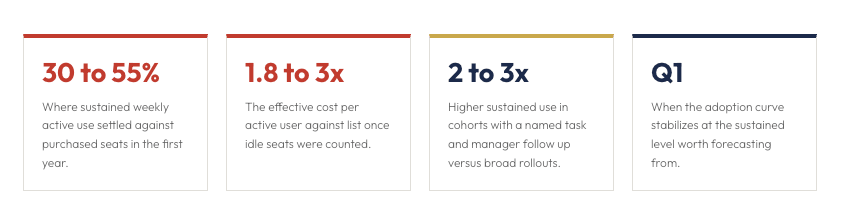
An intranet nobody maintained produces a Copilot nobody trusts, and the low adoption you were worried about on the intranet comes back, one layer up.
Adoption and AI-Readiness Are the Same Work
The reassuring part is that this is not two jobs. The work that will create an intranet people use is the work that will make AI reliable on top of it.
How to Measure Adoption So It Predicts AI Value
The signals that tell you an intranet is alive are the ones to start from:
- active users over time,
- whether search returns what people were looking for,
- and whether content owners are still publishing.
Those same signals now carry a second meaning. Besides being an engagement measure, publisher and owner activity predict whether AI will find something current when it looks. A section with an active owner is a section Copilot can trust. A section nobody has touched in a year answers questions wrongly, to a person or a model alike.
Keeping content current gets easier when it depends less on people remembering to update pages by hand. Content drifts fastest where a person maintains it from memory.
The more an intranet surfaces information dynamically, the less it rots.
A directory that syncs itself, a news feed that pulls in automatically, sections that draw from a single source rather than a copy: these lower the manual upkeep that causes the drift in the first place. See how that works with BindTuning's intranet. Clear ownership handles the rest.
This is what workspace integrity means in practice.
An intranet people want to use, and an intranet AI can reason over, are built from the same things: current content, clear ownership, sound structure. Treat adoption and governance as one discipline instead of two, and the effort you put into either pays back in both.
If you want to see where your own environment stands, that part is measurable. Other governance tools read permissions, ownership, lifecycle, and compliance signals.
The Integrity Score is the only Microsoft 365 scan that reads adoption and experience signals alongside the governance ones. It returns them as a single number with the domains dragging it down.
It is free, it changes nothing in your tenant, and it takes about the time it takes to get a coffee.
The intranet people avoid, and the Copilot answer nobody trusts, are the same content, seen from two sides. Fix it once, and you have fixed both.
FAQ
Is SharePoint enough on its own for an intranet?
SharePoint gives you the platform and the building blocks, not a finished experience. Out of the box, it can be difficult to brand consistently, slow to update without IT involvement, and hard to keep engaging, which is why so many SharePoint intranets end up underused. It becomes a strong intranet when it is built with a consistent design, clear ownership, and content that stays current. The platform is capable. The outcome depends on how you set it up and maintain it.
Why does SharePoint search return poor results?
Usually because the content underneath is disorganized, SharePoint search depends on clear structure, consistent metadata, and current files. When a library is full of near-duplicates, missing labels, and outdated versions, search returns exactly that, so people stop trusting it. Improving results is less about search settings and more about cleaning up and maintaining what sits beneath them.
What is the difference between adoption and engagement?
Adoption is whether people use the intranet at all and keep coming back. Engagement is how deeply they interact once they are there: reading, searching, contributing, acting on what they find. You can have a burst of adoption at launch with no lasting engagement, which is the pattern behind most intranets that fade after a few months. Durable adoption depends on content staying current enough to earn the next visit.
How long does it take to turn a stalled intranet around?
Less time than a full replacement, because the platform is usually not the problem. The work is design consistency, clear content ownership, and a structure people can navigate, applied to the SharePoint you already run. Engagements of this kind are often measured in weeks rather than the many months a migration takes, since you are improving what exists rather than moving to something new. The first step is knowing where you stand, which a governance and adoption scan will tell you.